Pages

Friday, 27 January 2012

The Network Will Truly Be the Computer

The Network Will Truly Be the Computer

Google's CEO, Eric Schmidt, wrote some interesting things in The Economist, and most of his beliefs are reflected in Google's plans.

The internet is much more than a technology—it's a completely different way of organizing our lives. But its success is built on technological superiority: protocols and open standards that are ingenious in their simplicity. Time after time they have trounced rival telecommunications standards that made perfect commercial sense to companies but no practical sense to consumers. (...)

In 2007 we'll witness the increasing dominance of open internet standards. As web access via mobile phones grows, these standards will sweep aside the proprietary protocols promoted by individual companies striving for technical monopoly. Today's desktop software will be overtaken by internet-based services that enable users to choose the document formats, search tools and editing capability that best suit their needs. (...)

Today we live in the clouds. We're moving into the era of "cloud" computing, with information and applications hosted in the diffuse atmosphere of cyberspace rather than on specific processors and silicon racks. The network will truly be the computer. (...)

The lesson is compelling: put simple, intuitive technology in the hands of users and they will create content and share it. The fastest-growing parts of the internet all involve direct human interaction.

Although Google doesn't want to admit they want to beat Microsoft, they bet on Internet's power to beat the desktop monopoly.

Google Data API Supports JSON

Google Data API Supports JSON

Google Data API has support for JSON. For the moment, the JSON output can be used in Blogger Beta, Calendar, and Google Base. As you probably know, JSON is an easy way to obtain data, parse it and use it in your web application. And because JSON uses JavaScript, the output can be used directly in the code.

Examples and details for the implementation can be found in Google Data APIs Developer's Guide.

Related:
Unofficial JSON API for Google Search

Why Use Google Book Search?

Why Use Google Book Search?


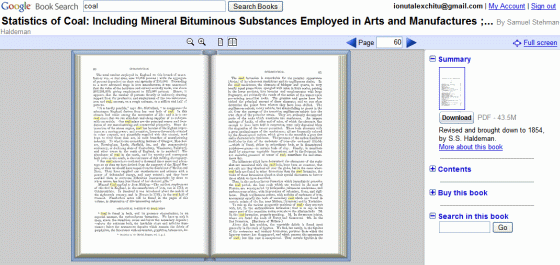
Google Book Search is a service that lets you search more than 500 million pages of scanned books and the number grows every day. But why would you need that when you could go to a library? Well, sometimes it's hard to discover books only from the title and description and once you discovered them it's hard to actually find them in libraries and book stores.

1. You have a quote from a book, but you don't know where it's from.

2. You have a quote from a book, and you want to find the context. Maybe you want to read the poem that contains the famous "eternal sunshine of the spotless mind".

3. Maybe you have a book and you want to read again a certain fragment. But it's hard to find it, even though you remember some keywords.

4. Search your bookshelves. You can't restrict the search to your books, but if you enter something unique (name of a character), you'll discover the book.

5. Search within books published in a certain year, to see different perspectives on a subject.

6. Find references from other books to a certain book.

7. Search for an affirmation or the prefix of an affirmation ("Paris is the only city...").

8. Find contexts for rare or difficult words (ineluctable).

9. Read out-of-copyright books online or download them as PDF files.

10. Detect plagiarism, as this article shows.

Related:
Google's Digital Library of Alexandria
Download public domain books

Google Blog Search OneBox

Google Blog Search OneBox


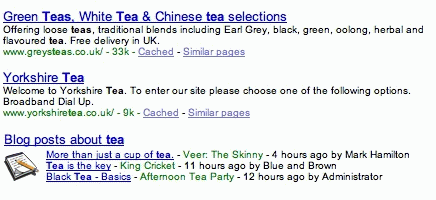
Andy Boyd spotted a new Google OneBox, for blog search, at the bottom of the search result page. The integration seems to be just an experiment and it's visible only to a small number of users.

Google has recently added links to Blog Search in Google News.

Related:
OneBox results

PortableApps Suite

PortableApps Suite

PortableApps Suite is a sort of Google Pack with portable versions for important software. You can get Firefox, Thunderbird, OpenOffice, Gaim, ClamWin Anti-virus and more in a single download and then copy these applications to your USB Flash drive. There's even a replacement for Start menu that lets you launch the applications.

Google Video Recommendations

Google Video Recommendations

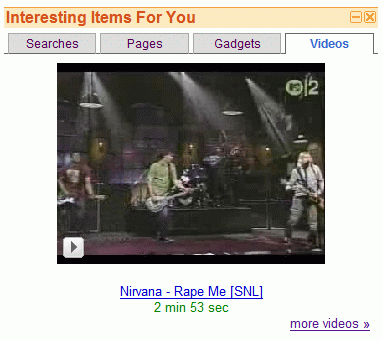
Remember the gadget called "Interesting Items for You", that shows recommended web searches, pages and gadgets? Now you can also get video recommendations. And if you click on the thumbnail, a small video player will appear.

It would be nice to see recommendations in Google Video. People are always happy to see there's something just for them on a site.

The gadget for Google Personalized Homepage is available here.

Gaia - Open Source Google Earth

Gaia - Open Source Google Earth

Gaia is "an attempt to reverse engineer Google Earth and implement its functionality in open, portable, customizable and [extensible] way".

Although the project is far from being completed, Gaia supports Keyhole authentication, 3D earth view, navigation, layers, NMEA GPS.

It will be interesting to watch this project and the added functionality. Google Earth is a proprietary application that runs on Windows, Mac and Linux, but lacks a real API. An open source alternative to Google Earth is NASA World Wind, which, ironically, is a Windows-only application.

{ Thank you, Artur Klauser. }

The Inefficiency of Feed Readers

The Inefficiency of Feed Readers

Feed readers are a very inefficient way to keep up with the news. As most news sites and blogs have feeds, you might think you save time by adding your favorite sites to a feed reader. After all, you don't have to visit them ever again if they publish full feeds or only if you find some interesting if they publish partial feeds.

Redundancy
A feed reader shows you the latest information from each site you've subscribed to. Often, many blogs discuss a single news, but you don't have all these posts at a glance. A feed reader should cluster related posts.

Closed universe
You have a list of feeds, but you can't discover new feeds organically. Your list of feeds should automatically based on your preferences.

Lack of order
There's no hierarchy in your feed reader. You may have only 5 minutes to find out what's new, but you don't know where to start. A good feed reader should rank posts and prioritize breaking news.

Sense of guilt
If you don't open/visit a feed reader for a week, you may end up with hundreds of thousands of unread posts. You may want to mark all as read and move on, but what if you lose something important? A feed reader forces you to read (or scan) each and every post.

No related universes
Maybe there are other people with similar tastes that may help you improve your universe. A feed reader should automatically detect that and suggest posts that were considered interesting by your virtual group of anonymous friends.

In most of these affirmations, I've described a typical feed reader. If you know one that does all of these things (or only some of them), let us know.

Preview Gmail Conversations

Preview Gmail Conversations

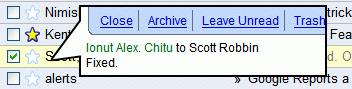
Mihai Parparita from Google created a brilliant Greasemonkey script last year. The script lets you right-click on a Gmail conversation and get a preview in a bubble. This way, you can read your mails faster, especially if you only want to read some of them.


The new Yahoo Mail and Windows Live Mail have a reading pane where you can preview your messages, but that takes a lot of space. This solution has the advantage that it's available on demand.

I know this is far from being new, but I've always wanted this feature in Gmail.

Greasemonkey details:
You need to have Greasemonkey in Firefox or Trixie in IE
Then install the script

Thursday, 26 January 2012

The Venice Project - the Future of TV?


Here's something interesting from TV's future: the Venice Project, "a secure P2P streaming technology that allows content owners to bring TV-quality video and ease of use to a TV-sized audience mixed with all the wonders of the Internet". The project tries to improve the TV experience by removing "artificial limits such as the number of channels that your cable or the airwaves can carry and then bringing it into the internet age; adding community features, interactivity".

The new service comes from the same people that created Kazaa and Skype, Niklas Zennstrom and Janus Friis. For the moment, the Venice Project is in closed beta.

Janus explains: "We are trying to bring together the best of TV with the best of the Internet. We think TV is one of the most powerful, engaging mass medias of all time. People love TV, but they also hate TV. They love the (sometimes…) amazing storytelling, the richness, the quality itself. But they hate the linearness, the lack of choice, the lack of basic things like being able to search. And wholly missing is everything that we are now accustomed to from the Internet: tagging, recommendations, choice, and so on… TV is 507 channels and nothing on and we want to help change that!"